Clinical Conductor <> Delfa Information Syncing
Last updated: October 19, 2026
Key Concepts
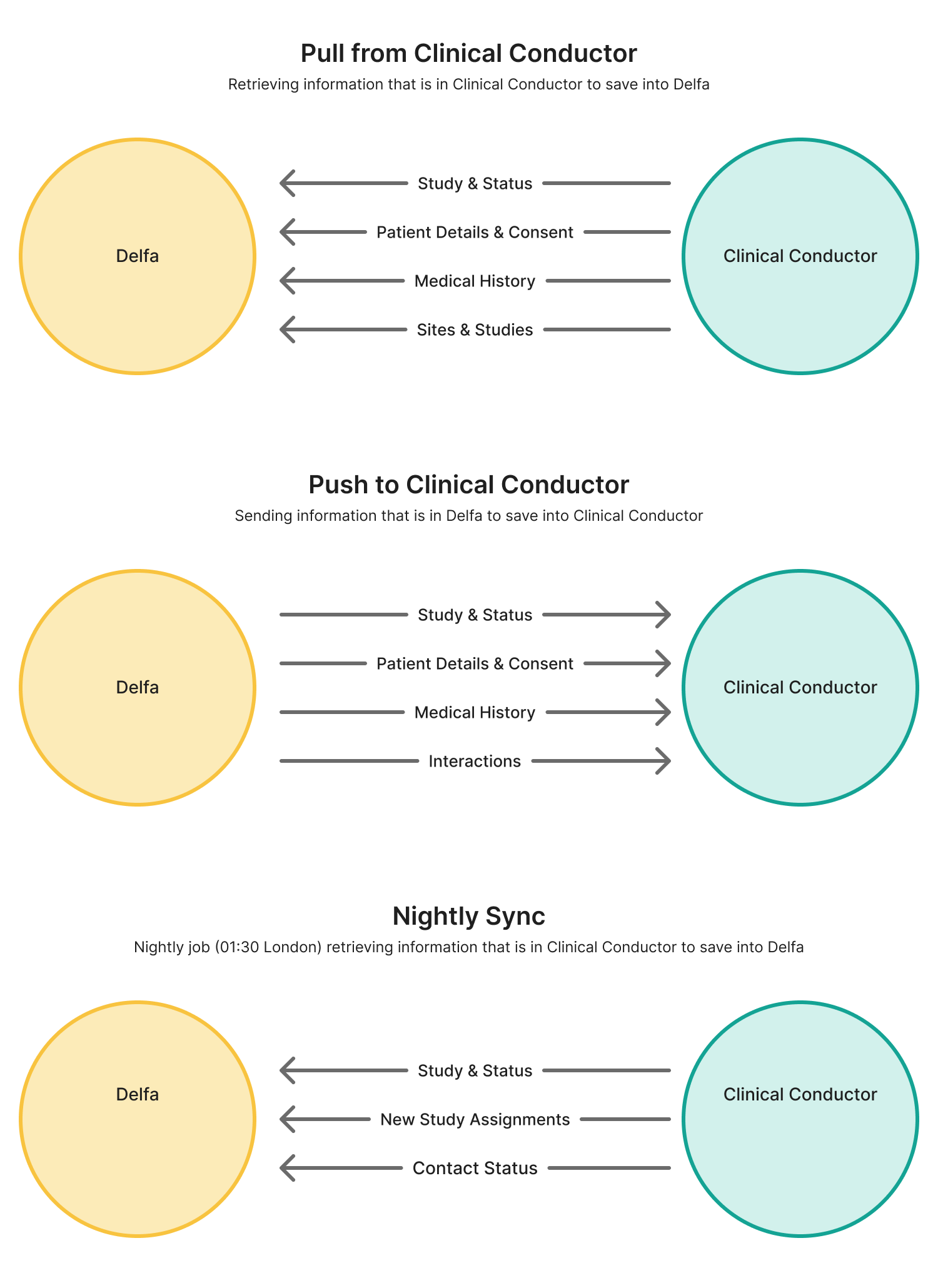
Pull: Clinical Conductor → Delfa
Push: Delfa → Clinical Conductor
Nightly Sync: a scheduled pull that runs every night at 01:30 London time
Information that moves between the two systems:
Patient details and consent
Patient-study (subject) statuses
Medical history
Interactions (Push only)
Studies and sites (Pull only)
Contact status: Active or Inactive in CC (Pull only)
Before anything syncs: each Delfa site needs its Clinical Conductor Site ID, and each study at that site needs its Clinical Conductor Study ID. Delfa sets these up during onboarding.
Pulling Patients
When a patient is pulled, Delfa first looks for them by their Clinical Conductor patient ID. If no patient is linked yet, Delfa matches on name plus email or phone, or on date of birth plus email or phone. If more than one Delfa patient matches, the pull stops so that no records are merged by mistake. If nobody matches, a new patient is created.
A pull brings in the patient's details, consent, medical history and every CC subject (study enrollment) they have. For each subject, Delfa creates the site, study and study assignment if they don't exist yet, and sets the status using your status mapping. A patient who is Inactive in CC is marked Do Not Contact when pulled into Delfa for the first time.
Manual Pull
Delfa imports your Clinical Conductor database before kick-off. After that, recruiters can pull in any patient who is in Clinical Conductor but not yet in Delfa.
Individual Pull
Check that the patient is not already in Delfa.
Open the patient in Clinical Conductor and copy the number after
PatientPKey=in the page address.In Delfa, go to Patients and click Import Patients in the top right.
Stay on the first tab, Single CTMS Import, and paste the number into Patient ID. You can search by Phone Number or Email instead; every CC patient that matches exactly is pulled.
Optionally choose sites, studies or a cadence.
Click Pull Patient.
Overwrite existing patient is ticked by default. If the patient is already in Delfa, their details and medical history are refreshed from Clinical Conductor. Untick it to only fill in what is missing.
Bulk Pull
Export the list of patients from Clinical Conductor as a CSV or Excel file.
In Delfa, go to Patients → Import Patients → Bulk CTMS Import.
Upload the file, choose Identify Patients By (Phone Number, Email or ID) and select the column that holds it.
Click Pull Patients. The pulls run in the background.
Automatic Pull
An automatic pull is set up for you by Delfa's team.
Nightly new-patient import (optional): each night, Delfa imports active CC patients who have a subject in Prescreened, Screened or Randomized status and are not yet in Delfa.
Pushing Patients
Manual Push
Click Push CTMS in the top right corner of a patient's profile. We recommend pushing when a patient is potentially qualified or scheduled, so the coordinator has the latest information.
A push:
creates the patient in Clinical Conductor, or updates them if they are already linked
creates or updates a CC subject for each study assignment whose status is mapped (see Status Mappings)
adds the patient's medical history
logs the patient's interactions as touches
Pull before you push. A push does not search Clinical Conductor by name, email or phone. Pushing a patient who already exists in CC but was never pulled into Delfa creates a duplicate patient in CC. Pull existing CC patients first, or add their Clinical Conductor Patient ID when assigning them to a site.
Automatic Push
An automatic push is set up for you by Delfa's team:
Cadence push: a Push to CTMS step in a cadence runs the same full push, for example right after an AI agent prescreens a patient.
Instant interaction logging: each new call, SMS, email or note is logged to CC as it happens. Applies to patients already linked to CC.
Instant status updates: each status change in Delfa is written to the patient's existing CC subject. This never creates new patients or subjects.
Information Breakdown
Interactions and Notes
Capability | When | Comment | |
|---|---|---|---|
Push | Yes | On every push; instantly on creation if enabled | Logged as touches in the patient's CC record, with the referral type and referrer name agreed at onboarding (default "Delfa"). Includes calls, AI SMS conversations (one touch per conversation, with a summary), SMS, emails, staff notes and submitted questionnaires. |
Pull | No | Delfa is the communication platform, so CC touches are not imported. | |
Nightly Sync | No |
The first push sends the patient's full eligible history. Each interaction is sent once; later edits in Delfa are not re-sent.
Patient Study Statuses
Capability | When | Comment | |
|---|---|---|---|
Push | Yes | On "Push CTMS" click, a cadence push, or instantly if enabled | Statuses are mapped and written to the CC subject. By default only statuses from prescreening onward are sent; see Status Mappings. |
Pull | Yes | On patient import and bespoke automations | CC subject statuses are mapped and applied to the patient's study assignments. |
Nightly Sync | Yes | Daily at 01:30 London time | Keeps Delfa up to date with coordinator updates in CC. See Nightly Status Sync below. |
Nightly Status Sync
Every night, Delfa checks the CC status of every study assignment linked to a CC subject. It takes the CC status only when:
it is at the same stage or further along the funnel than the Delfa status, and
it is not older than a status set in Delfa.
Delfa never swaps one prescreen result for another.
Delfa "Potentially Qualified", CC "Screened" → Delfa moves to In Screening.
Delfa "In Screening", CC "Prescreened" → Delfa keeps In Screening.
Delfa "Potentially Qualified", CC "NonQualified" → Delfa keeps Potentially Qualified.
The nightly sync also adds study assignments for new CC subjects of patients who are already in Delfa.
Study Referral Sources
Capability | When | Comment | |
|---|---|---|---|
Push | No | Touches carry the agreed referral type and referrer name instead. | |
Pull | No | Study assignments created from CC get the source "Clinical Conductor Import". | |
Nightly Sync | No |
Contact Info & Consent
Capability | When | Comment | |
|---|---|---|---|
Push | Yes | On every push | Name, date of birth, sex, race, ethnicity, height, weight, address, primary phone and email addresses. |
Pull | Yes | On patient import and bespoke automations | Same fields, plus guardian (as next of kin) and an alternate phone. |
Nightly Sync | Yes (contact status only) | Daily at 01:30 London time | A patient who becomes Inactive in CC is set to Do Not Contact in Delfa. When CC marks them Active again, Delfa sets them back to Available, unless someone in Delfa has set their status since. |
What Clinical Conductor allows:
Set only when Delfa creates the patient in CC: guardian, preferred name and primary site. CC does not allow Delfa to change these afterwards.
One phone number: only the primary phone is sent to CC.
Clearing a field in Delfa does not clear it in CC.
Consent
Push: SMS and email opt-ins are sent when Delfa creates the patient in CC. After that, only opt-outs are sent: an SMS opt-out turns off CC's text opt-in, and an email opt-out sets Do Not Email.
Pull: a CC SMS opt-in is used only if Delfa has no SMS consent on record. CC Do Not Email always removes email consent in Delfa. A CC opt-in never overrides an opt-out in Delfa.
Call consent: Clinical Conductor has no call consent or do-not-call field, so call consent is not synced. It is managed in Delfa.
Medical History (Conditions, Medications, Allergies, Procedures, Immunizations, Family and Social History)
Capability | When | Comment | |
|---|---|---|---|
Push | Yes | On "Push CTMS" click or a cadence push | Each item is matched to your CC catalogue and added to the patient in CC. |
Pull | Yes | On patient import and bespoke automations | Items in CC are added to the patient in Delfa. |
Nightly Sync | No |
Picklists. During onboarding, Delfa builds a picklist from your Clinical Conductor system catalogue. It maps Delfa values to the matching CC catalogue entries. On push, an item that can't be matched to your picklist is skipped; it is not sent as "Other". Tell your Delfa contact about missing values and we will add them.
CC only allows adding. Clinical Conductor's API lets Delfa add medical records but not edit or delete them.
An item edited in Delfa after it was pushed is not updated in CC. It shows Change not synced. Update this record in Clinical Conductor.
Deleting an item in Delfa does not remove it from CC.
Delfa checks the patient's CC records before adding, so items already in CC are not added twice.
On pull, items are added and never removed. Existing Delfa items only have blank fields filled in, unless Overwrite existing patient is ticked. A CC value with no Delfa equivalent comes in as "Other", with the CC name kept in the details.
Social history covers smoking, alcohol, marijuana, other substances and contraception.
Questionnaires
Capability | When | Comment | |
|---|---|---|---|
Push | Summary only | On every push | A touch records the questionnaire, the result (qualified, not qualified or incomplete), the number of answers and a link to the patient in Delfa. Individual answers are not written to CC. |
Pull | No | Recruiters fill in questionnaires in Delfa. | |
Nightly Sync | No |
The prescreen explanation is also added to the comment on the CC subject status.
Study Visits
Visits booked in Clinical Conductor appear in Delfa for studies that have a Delfa calendar set up. Delfa checks Clinical Conductor about every 30 minutes for new, moved, cancelled and completed visits, from 30 days ago to 180 days ahead.
Visits are added only to patients already in Delfa. Delfa does not create patients from Clinical Conductor visits.
When a visit is moved, its pending reminders move to the new time.
When a visit is cancelled, completed or marked as a no-show in Clinical Conductor, its pending reminders are cancelled.
Booking Clinical Conductor visits directly from Delfa is coming soon.
Study Information
Sites and studies from Clinical Conductor are created in Delfa automatically when patients are pulled and synced.
Capability | When | Comment | |
|---|---|---|---|
Push | No | Delfa does not change studies in CC. | |
Pull | Yes | On patient import and bespoke automations | Each CC subject's site and study are added to Delfa, and the study status is updated. A CC study running at two sites appears as one study per site. |
Nightly Sync | Yes | Daily at 01:30 London time | Sites and studies are added for new CC subjects of patients already in Delfa. |
How CC study statuses map to Delfa is listed in Status Mappings.
Summary Table
Information | Push | Pull | Nightly Sync |
|---|---|---|---|
Interactions and Notes | Yes: every push, or instantly if enabled | No | No |
Patient Study Statuses | Yes: "Push CTMS", cadence push, or instantly if enabled | Yes | Yes, 01:30 London |
Study Referral Sources | No | No | No |
Contact Info & Consent | Yes (see section) | Yes (see section) | Contact status only, 01:30 London |
Medical History | Yes: "Push CTMS" or cadence push | Yes | No |
Questionnaires | Summary only | No | No |
Study Visits | No | Yes: about every 30 minutes, for studies with a Delfa calendar | No |
Study Information | No | Yes | Yes, 01:30 London |