Inbound Call Handling
Last updated: November 3, 2026
Overview
When a patient calls one of your Delfa phone numbers, Delfa rings the recruiters who are available for that patient's sites and studies. If nobody is available, the call goes to voicemail, to a transfer number, or both, depending on your settings.
Admins set what happens when no recruiter is available. Each user decides whether calls ring for them.
Who Gets the Call
A recruiter's browser rings for an inbound call only when all of these are true:
Receive inbound calls is turned on in their account.
They have been active in Delfa in the last 30 minutes.
They have Delfa open in a browser tab for this organization.
Their site and study assignments match the caller.
If a recruiter expects calls but never hears them ring, check these four things first. See Recruiter Site and Study Assignments Process for assignments.
Turning Inbound Calls On or Off for Yourself
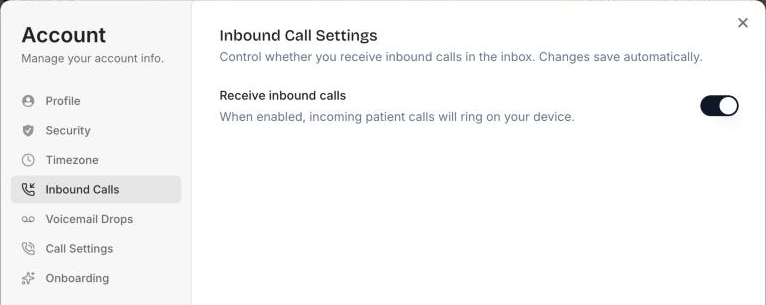
Open your user menu and select Manage account.
Open the Inbound Calls tab.
Turn Receive inbound calls on or off.
It is on by default. Turn it off if you do not take patient calls.
Setting What Happens When No Recruiter Is Available
Admins only.
Open organization settings (click your organization name and select Manage) and go to Inbound Settings.
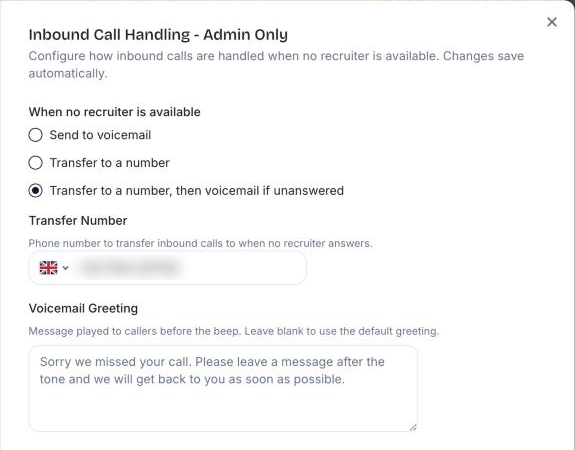
Under When no recruiter is available, choose one:
Send to voicemail (default): the caller hears your greeting and can leave a message.
Transfer to a number: the call is forwarded to your Transfer Number.
Transfer to a number, then voicemail if unanswered: Delfa tries the transfer number first and takes a voicemail if nobody answers.
If you chose a transfer option, enter the Transfer Number.
If you chose a voicemail option, edit the Voicemail Greeting or leave the default.
Changes save automatically.
Site Transfer Numbers
A site can have its own Inbound Transfer Number, set on the site's page under Sites. When a call belongs to that site, Delfa uses the site's number instead of the organization's Transfer Number.
Best Practices
Use a transfer number that is staffed during your calling hours, such as a front desk line.
Choose Transfer to a number, then voicemail if unanswered if your transfer line is not always staffed, so no call is lost.
Keep the greeting short and say when the patient can expect a call back.
Ask recruiters who are away from their desk for a long time to turn off Receive inbound calls.
Review voicemails and callbacks in Delfa every day. See Calls and Callbacks Process.