Calls and Callbacks Process
Last updated: October 19, 2026
Purpose: This document explains how recruiters use the Communications page to review calls, SMS and email with patients, and how to manage the follow-up tasks created from those communications.
Process
The Calls and Callbacks pages have been replaced by a single Communications page. Follow-up work that used to live on the Callbacks page is now handled through follow-up tasks.
Communications Page
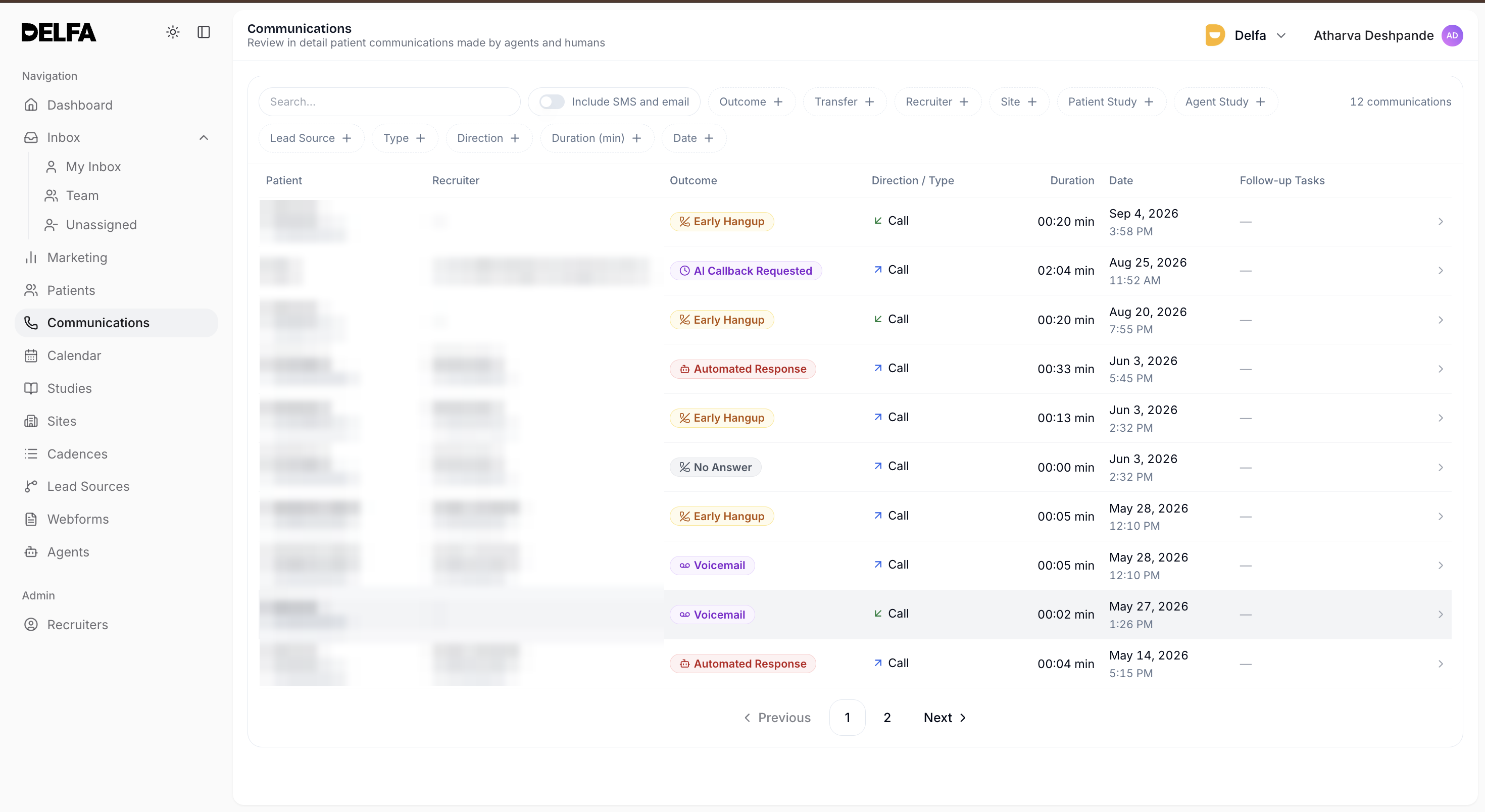
Open Communications from the sidebar to review communications handled by AI agents and recruiters. By default the list shows calls. Turn on Include SMS and email to see all message types.
Communication Filters
- Outcome: grouped into Unreachable, Refusal, Success, Other and Inbound › Missed
- Transfer
- Recruiter: recruiters and agents
- Site, Patient Study, Agent Study and Lead Source
- Type: Call, SMS or Email
- Direction: Inbound or Outbound
- Duration (min)
- Date
Communications Workflow
1. Open the Communications page.
2. Apply filters to narrow the list.
3. Use search to find a patient quickly.
4. Select a row to open the communication's details.
5. Review the communication before taking any follow-up action elsewhere in the PRM.
Reviewing a Communication
You can play the recording when one is available. The details panel has two tabs:
- Overview: the patient, direction, a summary, the outcome and transfer status, and any follow-up tasks.
- Transcript: the full call transcript, or the message thread for SMS.
Missed Inbound Calls
- Inbound calls that no one answered are marked Missed. To list only these calls, filter by Outcome › Inbound › Missed.
- For a missed inbound call, the details show how long the call rang and which recruiters it rang, including anyone who was busy.
- Lead recruiters can select the Activity link to change inbound call settings.
Follow-up Tasks
- When a patient asks to speak with a person, Delfa automatically creates a Call task for a recruiter. The task notes explain why. A patient's request for a human callback is always marked high priority.
- Due times follow the priority: high priority is due in about 15 minutes, medium within an hour, and low the next day. If the patient asked for a specific time, the task is due then.
- Automatic callback tasks can be turned off for a cadence with the Generate recruiter callbacks setting in the cadence editor.
- The Follow-up Tasks column shows when each task is due (for example "Due today" or "Overdue 2 days") or whether it is Completed or Canceled.
- To add your own follow-up, open the communication and select Add Task. The task stays linked to that communication. Add Task is only available when the communication is linked to a patient.
- To update a task, edit its notes or change its status to Completed or Canceled. You can also work tasks from the Inbox.
Best Practices
- Review the summary and transcript before acting on an automatically created task.
- Record what happened in the task notes, then mark the task Completed or Canceled so the queue stays accurate.
- Use the Inbox to work follow-up tasks alongside the rest of your queue.