RealTime <> Delfa Information Syncing
Last updated: October 19, 2026
Information is shared between the Delfa patient recruitment management platform and the RealTime clinical trial management system.
Key Concepts
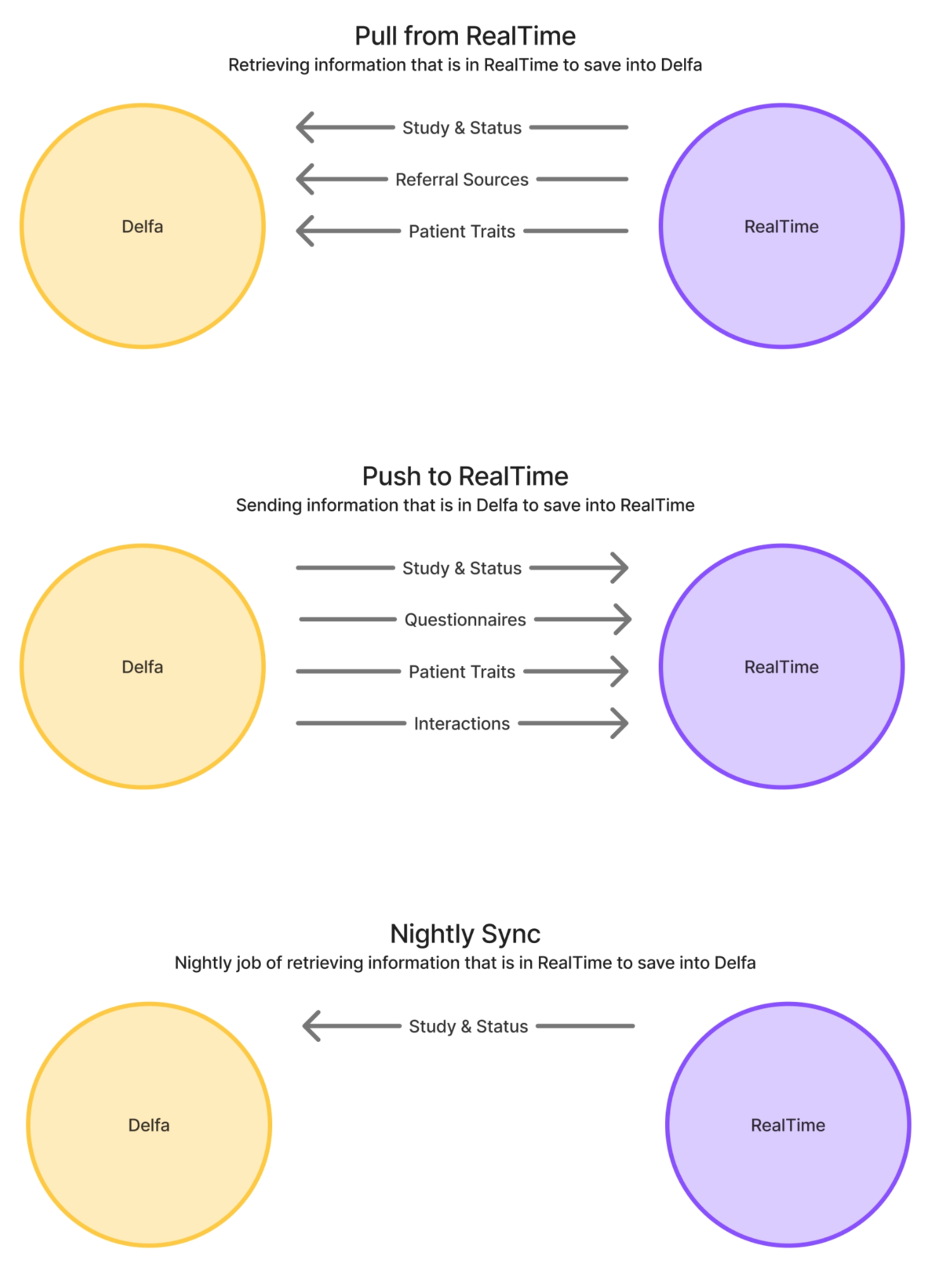
Pull: RealTime → Delfa
Push: Delfa → RealTime.
Patient information can be pulled and pushed across RealTime and Delfa. This information includes entities
Patient Traits
Patient-study subject Statuses
Referral Sources
Questionnaires (Only Push)
Interactions (Only Push)
Pulling Patients
Patients can be imported (pulled) into Delfa from RealTime. During a patient pull, we check if the patient already exists in Delfa first by an existing RealTime subject ID and site ID otherwise by a mix of name, email, phone and date of birth. If we find a matching patient, that patient’s profile in Delfa will be updated with information from RealTime. If we do not find a matching patient, we will create a new patient with the information from RealTime. To know exactly what information is pulled and when, please see the Information Breakdown section.
Manual Pull
A “manual” pull means that you or another individual are explicitly pulling in a patient from RealTime through Delfa’s interface. Delfa facilitates a manual database import before kick off so that you can start with your RealTime database in the platform.
However, as a recruiter or recruitment manager, it is important to learn how to pull patients on your own. Down the line you may find a patient that is in RealTime but is not in Delfa. There is a seamless way to get that patient into Delfa, both on an individual and bulk level.
🎬 Manual Pull Tutorials - Please watch
Individual Pull
If you see an individual that is present in RealTime but not present in Delfa:
Double check that the patient is not in Delfa. See section “Searching by RealTime ID in Delfa”
Go to the patient’s recruitment profile in RealTime.
Go to the “Profile” tab and copy the value after “Patient Key” into your clipboard.
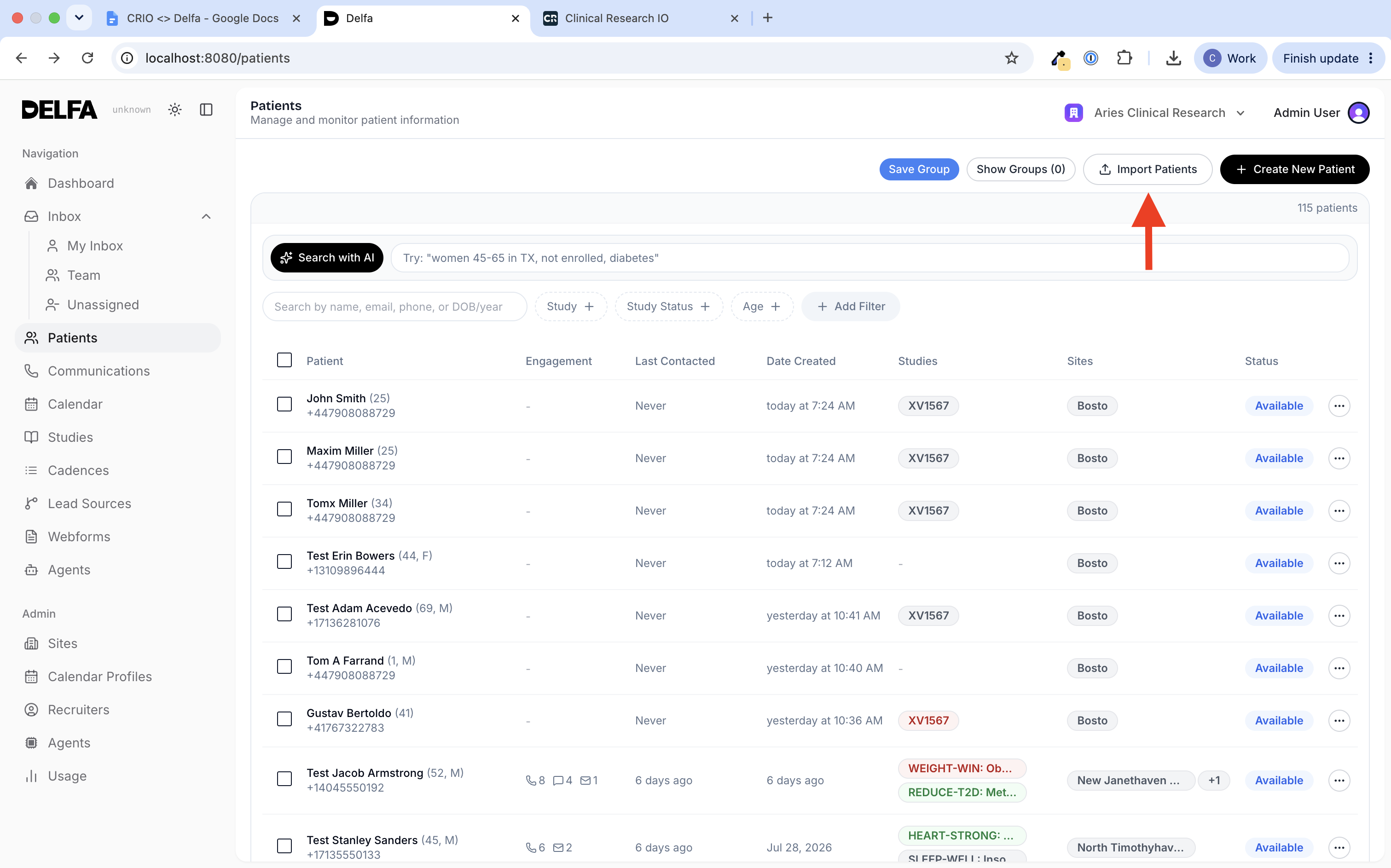
Go to the “Patients” page in Delfa and click on the “Import Patients” button in the top right.
A modal will pop up, stay in the first tab “Single CTMS Import”.
Copy the patient key into the field called “Patient ID”.
Configure any extra settings like site assignments, study assignments, or cadence executions. This is optional and please note that when we pull in a patient we will assign them to any studies and sites they are assigned to on RealTime.
Scroll all the way to the bottom and click “Pull Patient”.
Please watch the following video to see an example.
https://drive.google.com/file/d/1Kn5owashea4jx3xj_GL8J_P-GqI1dXWu/view?usp=drive_link
Bulk Pull
If you have a list of patients that are present in RealTime but not present in Delfa:
Configure this list as a smart list in RealTime.
Download the smart list using the “Export CSV” button.
Go to the “Patients” page in Delfa and click on the “Import Patients” button in the top right.
A modal will pop up, go to the second tab titled “Bulk CTMS Import”.
Drag the downloaded CSV into the filedrop field.
Under Identify Patients By, choose Phone Number, Email or ID, then select the column that holds it.
Configure any extra settings like site assignments, study assignments, or cadence executions. This is optional and please note that when we pull in a patient we will assign them to any studies and sites they are assigned to on RealTime.
Scroll all the way to the bottom and click “Pull [number] Patients”.
Please watch the following video to see an example.
https://drive.google.com/file/d/1q8uciO2LEiFl802r4HDpsRJEybK7uRBx/view?usp=sharing
Service: Automatic Pull
An “automatic” pull means that a patient is pulled from RealTime to Delfa as part of an automation set up for you by Delfa’s team.
For example, if a lead comes in through a meta form or webform, we can look for that patient in RealTime based on email or phone number, and pull in that patient’s info from RealTime.
Delfa also pulls from RealTime on a schedule:
Every night, Delfa imports patients added to RealTime that are not yet in Delfa, updates study statuses, and updates the study statuses of patients already in Delfa.
Every hour on weekdays, during US and Australia/New Zealand business hours, Delfa pulls study status changes made in RealTime that day and imports patients added to RealTime that day.
Every night, Delfa pulls medical history, medications, allergies, surgeries, social history and contacts that changed in RealTime for patients already linked to RealTime.
Pushing Patients
Patient information collected in Delfa can be pushed to RealTime. To know exactly what information is pushed and when, please see the Information Breakdown section.
Manual Push
A “manual” push means that you or another individual are explicitly pushing a patient from Delfa to RealTime through Delfa’s interface.
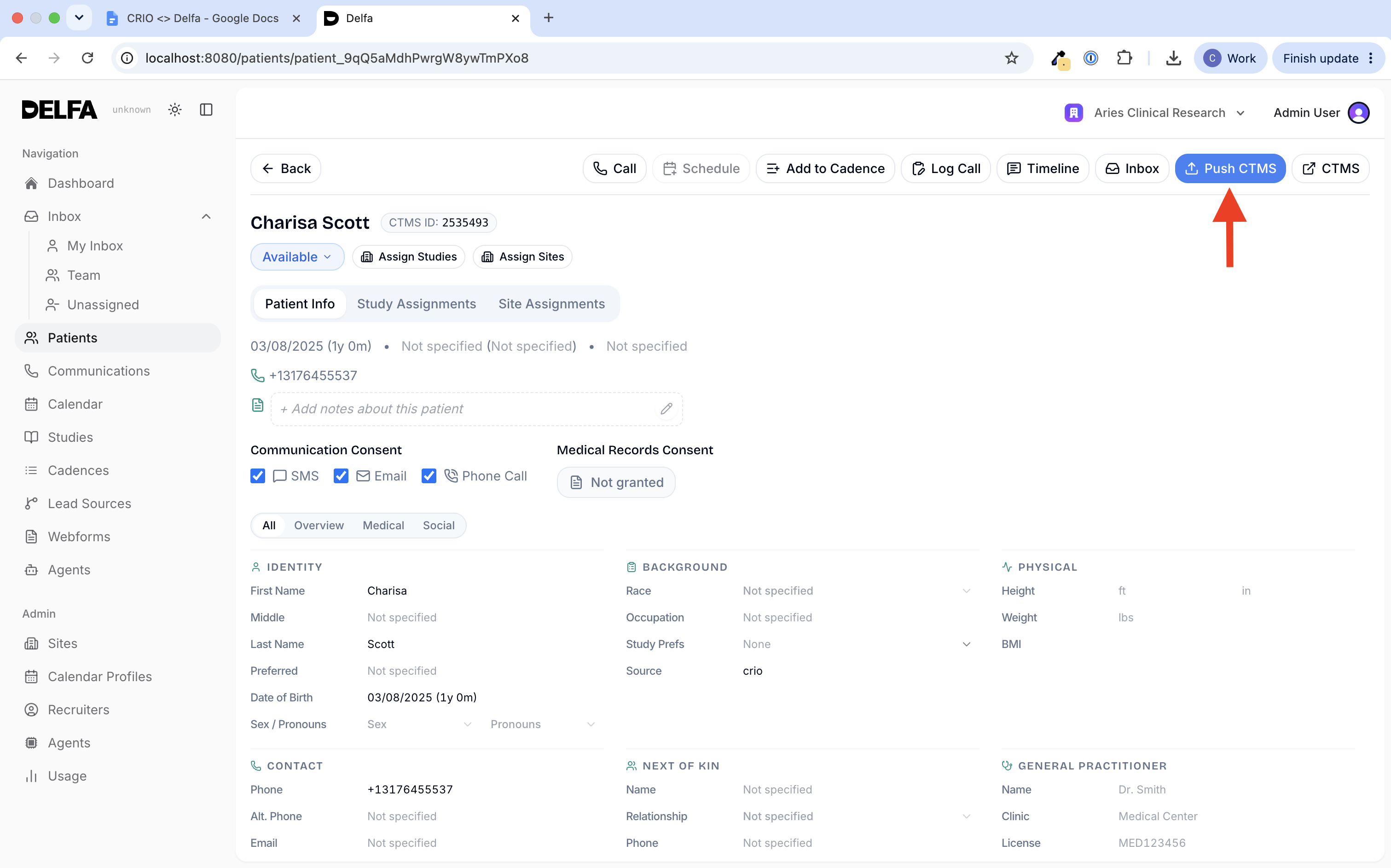
Simply click the “Push CTMS” button on the top right corner of a patient’s profile when you want to manually push a patient. We recommend clicking “Push CTMS” when a patient a patient is potentially qualified and/or scheduled so a coordinator has the most recent information for the patient they will be seeing.
Service: Automatic Push
An “automatic” push means that a patient is pushed to RealTime from Delfa as part of an automation set up for you by Delfa’s team.
For example, a cadence can include a Push to CTMS step. When the patient reaches that step, Delfa pushes the patient to RealTime, the same as clicking “Push CTMS”. Delfa can also turn on instant pushes of interactions and study status changes for your organization.
Information Breakdown
Patient Information
Each entity has its own push and pull capabilities and options.
Interactions and Notes
Capability | When | Comment | |
|---|---|---|---|
Push | Yes | On push. Instantly on creation, if Delfa has turned this on for your organization. | We understand that coordinators may want to see the full history of patient communications, therefore we support pushing interactions to a patient’s interactions list in their recruitment page on RealTime. These interaction’s will come from an account for Delfa that is set up during the onboarding process. |
Pull | No | Delfa is a platform for communication hence we do not support communication in other vendors/platforms. | |
Nightly Sync | No |
Patient Study Statuses
Capability | When | Comment | |
|---|---|---|---|
Push | Yes | On “Push CTMS” button click | |
On a cadence “Push to CTMS” step, or instantly when the status changes if Delfa has turned this on for your organization | When a push is triggered, any study statuses in Delfa will be mapped and pushed to the patient in RealTime. | ||
Pull | Yes | On patient import and bespoke automations | When a pull is triggered, any study statuses in RealTime will be mapped and pulled to the patient in Delfa. |
Nightly Sync | Yes | Nightly, and hourly on weekdays | Runs every night to keep study statuses up to date with coordinator updates. Start times: 22:00 Chicago time in the US, 00:00 Berlin time in the EU, and 00:00 Sydney time in Australia. On weekdays, a lighter sync also runs every hour from 09:00 to 21:00 New York time in the US and from 09:00 to 20:00 Auckland time in Australia and New Zealand. See section titled Nightly Status Sync for details. |
Nightly Status Sync
Every night, we look at every open patient-study (subject) pair that exists in Delfa and check its status in RealTime. Pairs already in a final status are skipped. The patient’s study status is updated to what is in RealTime when the RealTime status is further along the funnel than the status in Delfa. It is also updated, even backwards, when the Delfa status last came from RealTime and the RealTime change is newer. If someone changed the status in Delfa after the RealTime change, Delfa keeps its own status.
Example: A patient in Delfa is “Potentially Qualified” but in RealTime they are at “Contact Attempt 1” - we do not take RealTime’s status.
Example: A patient in Delfa is “Potentially Qualified” but in RealTime they are “Scheduled For SCREEN” - we take RealTime’s status.
Study Referral Sources
Capability | When | Comment | |
|---|---|---|---|
Push | Yes | On push, when Delfa creates a subject or assigns a subject to a new study | Admins map Delfa sources to RealTime referral sources in Manage → CTMS Settings → Referral sources. The Study assignment sources mapping is used first. Patient sources are used when the study assignment source has no mapping. Patients with no source use your organization’s default referrer, set up by Delfa. |
Pull | Yes | On patient import and bespoke automations | The referral source from RealTime is pulled onto the patient’s study assignment. If RealTime has no referral source, the source is set to “RealTime Import”. |
Nightly Sync | No |
Contact Info & Consent
Capability | When | Comment | |
|---|---|---|---|
Push | No | RealTime does not expose consent fields in their API. | |
Pull | Yes** | On patient import and bespoke automations | When a pull is triggered, any consent tracked on RealTime will update the consent fields in Delfa. |
Nightly Sync | No |
**Note: RealTime does not have a concept of tracked call consent, only SMS consent. We will need written agreement that your RealTime database has call consent. We can also optionally opt out patients from call consent when they have opted out from SMS consent, which is recommended.
Procedure Traits (Medications, Events, etc)
Capability | When | Comment | |
|---|---|---|---|
Push | Yes | On “Push CTMS” click | |
On a cadence “Push to CTMS” step | When a push is triggered, any patient traits in Delfa will be mapped and pushed to the patient’s procedures in RealTime. | ||
Pull | Yes | On patient import and bespoke automations | When a pull is triggered, any patient traits in RealTime’s procedures will be mapped and pulled to the patient in Delfa. |
Nightly Sync | Yes | Nightly | Changes made in RealTime in the last two days are pulled for patients already linked to RealTime. |
When Delfa builds a full patient push, the medical information in the patient’s profile is mapped to the medical sections in your RealTime.
Allergies in Delfa are added to allergies in RealTime etc. During this mapping, Delfa applies your RealTime picklists which is a configured allow-list of acceptable values for a specific field on the outbound push request. This picklist is configured based on the medical drop downs in your RealTime patient profiles.
If a value in Delfa can’t be mapped any value in your picklists, “Other” will be chosen and a comment with the value will be written in the entity.
Questionnaires
Capability | When | Comment | |
|---|---|---|---|
Push | Yes | On “Push CTMS” click or a cadence “Push to CTMS” step | |
Pull | No | As we expect recruiters to work out of the PRM the ideal flow is filling out questionnaires in Delfa and pushing the patient to CTMS. | |
Nightly Sync | No |
We take the answers already collected in Delfa for that patient on a given study and compare them to the interview questions set up for that study in RealTime.
An AI reviewer looks at both sides and fills in a RealTime question only when the Delfa answers clearly support it. If the link isn’t obvious, that RealTime question is left alone — we don’t guess or stretch the data.
For yes/no-style RealTime questions, the answer must match one of RealTime’s allowed choices (Yes, No, or N/A). For free-text questions, we write a short answer based only on what the patient answers in Delfa’s questionnaire.
Only yes/no and free-text (Narrative) RealTime questions are filled in. Other question types are skipped. For questionnaires imported from RealTime, answers go straight to the matching RealTime question.
Study Visits
RealTime does not support scheduling via its API so this service is not currently available. Appointments made in Delfa will not be synced to RealTime.
Capability | When | Comment | |
|---|---|---|---|
Push | No | RealTime does not support scheduling via its API | |
Pull | No | RealTime does not support scheduling via its API | |
Nightly Sync | No |
Study Information
Study information in RealTime is automatically populated in Delfa when we pull in and sync patients.
Capability | When | Comment | |
|---|---|---|---|
Push | No | RealTime does not provide APIs to update studies. | |
Pull | Yes | On patient import and bespoke automations | When a patient is pulled in, we add any studies that they are assigned to to Delfa. |
Nightly Sync | Yes | Nightly | When a patient is synced at night, we add any studies that they are assigned to to Delfa. Study statuses are also updated from RealTime every night. |
Summary Table
Capability | When | Note | ||
|---|---|---|---|---|
Interactions and Notes | Push | Yes | On push. Instantly on creation, if Delfa has turned this on for your organization. | |
Pull | No | - | ||
Nightly Sync | No | - | ||
Contact Info & Consent | Push | No | ||
Pull | Yes** | On patient import and bespoke automations | **See section for details. | |
Nightly Sync | No | - | ||
Procedure Traits (Medications, Events, etc) | Push | Yes | Click “Push CTMS” | |
On a cadence “Push to CTMS” step | ||||
Pull | Yes | On patient import and bespoke automations | ||
Nightly Sync | Yes | Nightly | ||
Questionnaires | Push | Yes | Click “Push CTMS” | |
On a cadence “Push to CTMS” step | ||||
Pull | No | - | ||
Nightly Sync | No | - | ||
Patient Study Statuses | Push | Yes | Click “Push CTMS” | |
On a cadence “Push to CTMS” step | ||||
Pull | Yes | On patient import and bespoke automations | ||
Nightly Sync | Yes | Nightly, and hourly on weekdays | ||
Study Referral Sources | Push | Yes | On push | |
Pull | Yes | On patient import and bespoke automations | ||
Nightly Sync | No | - | ||
Study Visits | Push | No | - | |
Pull | No | - | ||
Study Information | Pull | Yes** | On patient import and bespoke automations | **See section for details. |
Push | No | - | ||
Nightly Sync | ||||
Yes** | Nightly | **See section for details. |